Big Possibilities, Small Footprint: Why an A2/A3 Desktop Printer Belongs in Every Creative Business

Not every business needs a room-sized industrial printer. But if you’re working with a standard letter-size (A4) printer, you are leaving opportunities on the table — literally.
The A2/A3 desktop printer offers the perfect balance: professional-grade output, a compact footprint, and global affordability. Whether you’re in London, Shanghai, or São Paulo, these workhorses are helping freelancers, print shops, and e-commerce sellers unlock new revenue streams .
What Are A2 and A3 Desktop Printers?
Let’s simplify the sizing :
· A3 (297mm × 420mm / 11.7″ × 16.5″) – Twice the area of A4. Perfect for double-page spreads, small posters, menus, and blueprints.
· A2 (420mm × 594mm / 16.5″ × 23.4″) – Four times A4. True large-format territory — art prints, presentation boards, retail signage .
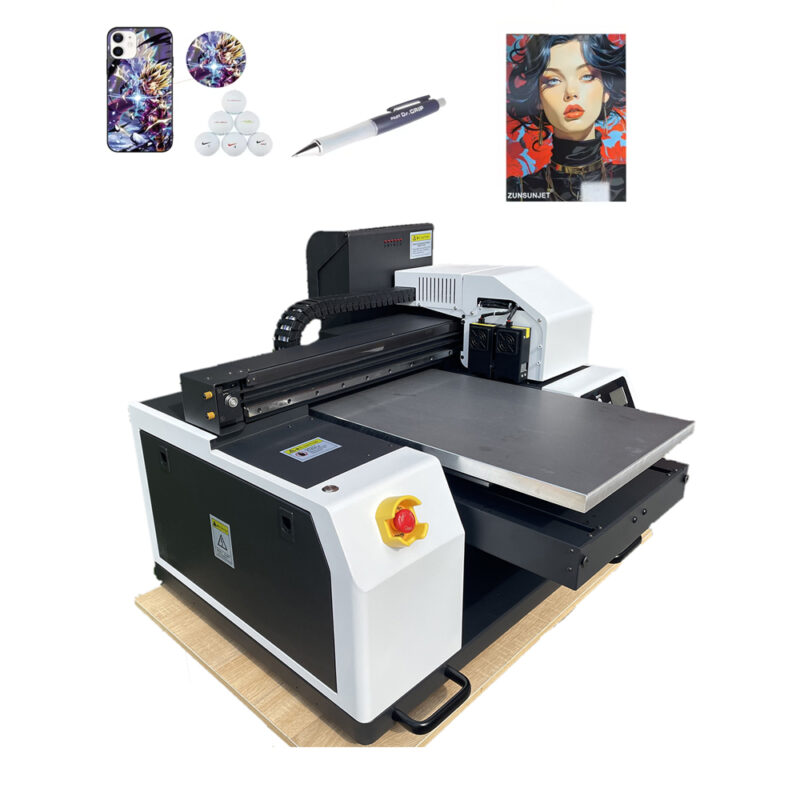
An A2/A3 desktop printer fits on a standard table (unlike floor-standing plotters) but prints media up to 13″ wide (A3+) or 17″ wide (A2) . Models from Canon, Epson, and others bring gallery-quality output to your home office or studio .
Why Global Customers Are Choosing A2/A3 Desktops
- Professional Quality, Prosumer Price
You don’t need a $10,000 machine to sell $200 art prints. High-end A2/A3 desktop printers feature pigment-based inks for exceptional fade resistance and archival longevity .
· Canon imagePROGRAF PRO-510 (A2): 12-color pigment ink system with new “LUCIA PRO II” ink — delivers deeper blacks, richer blues, and impeccable detail .
· Canon imagePROGRAF PRO-310 (A3+): 10-color pigment ink system — ideal for fine art and gallery-quality prints .
· Canon PIXMA PRO-200S (A3+): 8-color dye ink system — vibrant colour photo printing for enthusiasts .
Key innovation: The latest PRO-series printers feature CO (clear) ink that reduces gloss unevenness (bronzing) and a new matte black ink that enhances black density on art paper — ensuring neutral grey balance and smooth tonal transitions .
- Massive Product Catalog from One Machine
What can you print with an A3 or A2 desktop printer? Almost everything:
· 📸 Fine art photography prints (giclee)
· 🍽️ Restaurant menus (waterproof, tear-resistant)
· 🎨 Greeting cards & invitations (thick cardstock support)
· 📦 Product packaging prototypes
· 🧭 Posters & event signage
· 👕 Heat transfer paper (DTF & sublimation)
· 🏷️ Stickers & labels
· 📐 Blueprints & CAD drawings
One machine replaces a dozen outsourced services.
- Borderless Printing & Custom Sizes
Newer A2/A3 desktop models support expanded print sizes that traditional printers can’t handle :
imagePROGRAF PRO-510 (A2) adds 7 new standard sizes:
7″×10″, 9″×13″, 11″×14″, 13″×19″, 16″×20″, 17″×25″, 12″×12″
Also: Borderless printing in B4, Legal (8.5″×14″), 13″×19″, 17″×25″
imagePROGRAF PRO-310 (A3+) adds 3 new standard sizes:
9″×13″, 11″×14″, 13″×19″
Also: Borderless printing in A5, B5, B4, Legal, 11″×14″, 13″×19″
Maximum print length: PRO-510 prints up to 3.276m (10.7ft) — perfect for banners and panoramic prints. PRO-310 prints up to 1.8m (5.9ft) .
- Handle Thick & Specialty Media
Premium A2/A3 desktop printers support a wide range of media:
· Standard: 240–300 gsm fine art paper
· Heavy: Up to 1.5mm thick (mat board, thin plywood, vinyl sheets)
· Specialty: Canvas, silk, rice paper, adhesive vinyl, magnetic sheets
- Advanced Printhead Technology = Precision & Reliability
The latest PRO-series printers feature high-density printheads with 1,536 nozzles per colour and the “FINE” (Full-photolithography Inkjet Nozzle Engineering) printhead technology .
Key reliability features:
· Nozzle failure compensation: When sensors detect a clogged nozzle, another nozzle automatically fills in — ensuring uninterrupted, flawless prints .
· Automatic colour calibration: Built-in sensors adjust output to maintain consistent quality across runs .
- Smart Software for Professional Workflows
All new PRO-series printers include Canon Professional Print & Layout software — a powerful but intuitive tool that supports :
· ICC profile management for colour accuracy
· Automatic image layout — arrange multiple images on one sheet to save paper and time
· Colour temperature proofing — print multiple colour variations in one job to choose the best
· Contrast reproduction control for precise shadow and highlight rendering
· Plugin integration with Adobe Photoshop and Canon’s Digital Photo Professional
- Compact Design, Global Ready
Unlike large-format plotters, A2/A3 desktop printers :
· Fit on a standard 60cm deep desk
· Weigh between 14kg and 32kg (A3 models lighter, A2 slightly heavier)
· Operate on 110V/220V power (global compatibility)
· Feature user-replaceable maintenance tanks for easy upkeep
Global market context: The professional photo printer market continues to grow, driven by demand from photographers, artists, and designers for high-quality, on-demand printing . The large-format printer market (including A2/A3 segments) is projected to reach approximately $10.5 billion in 2024, growing at 5.8% CAGR through 2034 .
Who Is Buying A2/A3 Desktop Printers?
Customer Type What They Print Why A3/A2
Fine art photographer Gallery prints, archival images Archival pigment ink, colour accuracy, up to 200-year fade resistance
Graphic designer Mockups, packaging prototypes Borderless, thick paper support, custom sizes
Etsy seller Stickers, cards, art prints Low entry cost, fast turnaround, professional quality
Architect/engineer CAD drawings A3 is standard for blueprints; expanded sizes for larger plans
Print-on-demand shop Transfer paper for DTF/sublimation Flat platen, heat-resistant inks
Small signage shop Menus, flyers, small posters Quick setup, no outsourced delays
Art schools & universities Student portfolios, exhibition prints Versatile media support; print-on-demand for classes
Commercial photographers Client proofs, exhibition prints Fast print speeds, colour contract-proof quality
A3 vs A2: Which One Do You Need?
Feature A3 (e.g., PRO-310) A2 (e.g., PRO-510)
Max media width 330mm (13″) 432mm (17″)
Ink colours 10-color pigment 12-color pigment
Max print length 1.8m 3.276m
Typical price range (USD) ~$1,250 ~$2,500
Desk footprint Compact Larger but still desktop-friendly
Best for Posters, menus, packaging prototypes, student work Fine art, large signage, panoramic prints, professional portfolios
The ROI: Small Investment, Big Returns
Let’s use realistic global pricing (USD):
A3 Printer Investment (PRO-310): ~$1,250
A2 Printer Investment (PRO-510): ~$2,500
Per-Print Economics (Fine Art, A3 Size)
· Paper + ink cost: $1.00 – $2.00
· Selling price (unframed): $25 – $75
· Gross margin per print: 92-96%
Example: Sell just 15 fine art prints per month at $40 each = $600 gross profit.
A3 printer pays for itself in 2-3 months. A2 printer in 4-5 months.
Add greeting cards (sell $5 each, cost $0.60), stickers (sell $3, cost $0.15), or restaurant menus ($2/page, cost $0.20), and you’re profitable within weeks.
What to Look for When Buying (Global Buyer’s Guide)
✅ Ink Technology
· Pigment-based – Best for archival prints, fine art, and professional photography
· Dye-based – Vibrant colours, ideal for consumer/enthusiast use
· Minimum 10-12 colours – For professional results, look for photo cyan/photo magenta/red/blue/grey inks alongside CMYK
✅ Printhead Features
· Micro-droplet technology — look for 1.5-4 picolitre droplet sizes for smooth gradations
· Nozzle failure compensation — automatically replaces blocked nozzles to maintain image quality
· Colour calibration built-in — reduces manual adjustment time
✅ Supported Media
· Thickness range: Up to 1.5mm (for fine art paper, cardstock, vinyl)
· Custom sizes: Does the printer support the sizes your clients request? Latest models add many new options
· Borderless printing: Essential for professional photo output
✅ Software & Workflow
· Does it include a professional RIP or layout software? Canon Professional Print & Layout is included and integrates with Photoshop
· Does it support ICC profiles for accurate colour management?
· Can you print colour variations in one job to save paper and time?
✅ Certifications (Important for Global Markets)
· CE – European safety standard
· RoHS – Restriction of hazardous substances
· Energy Star – Energy efficiency
✅ Support & Warranty
· Is there a local service network?
· Are inks and maintenance parts readily available in your region?
· What is the warranty period? (Typically 1-2 years)
✅ Pre-purchase Checklist
· ✅ Get sample prints on YOUR paper types before buying
· ✅ Ask for a live or video demo showing speed and quality
· ✅ Verify ink availability and pricing for your region
· ✅ Check power compatibility (110V/220V) — most models support both
Ready to Stop Outsourcing and Start Printing In-House?
Every day you pay a print shop $20 for a single poster is a day you delay owning the machine. With an A2/A3 desktop printer, you control quality, turnaround time, and 100% of the profit.
No more waiting. No more minimum orders. No more giving away your margin.
